Game Top-Up Nepal: Buy PUBG UC, Free Fire Diamonds and More
Game Top-Up Nepal: Buy PUBG UC, Free Fire Diamonds and More
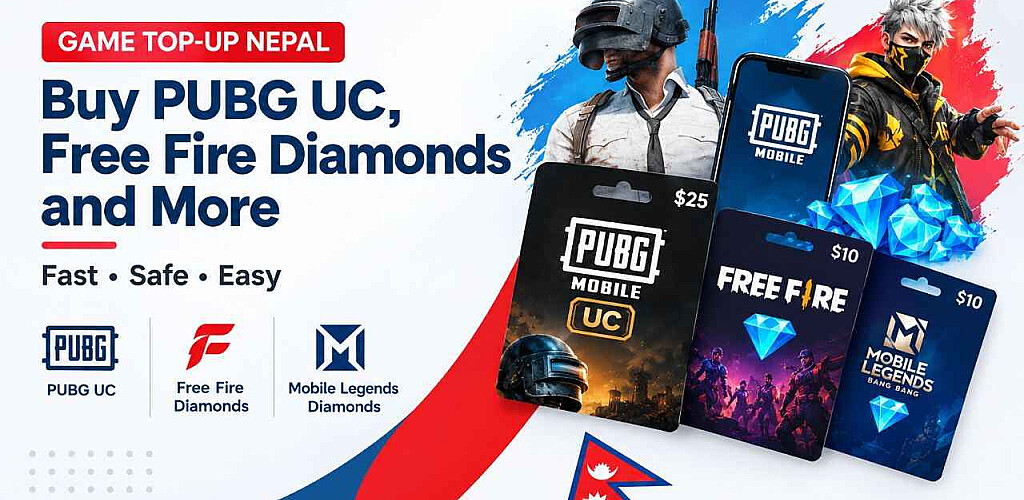
What is a game top-up in Nepal? In Nepal, a game top-up is a purchase of in-game currency, such as PUBG UC, Free Fire Diamonds, or Mobile Legends Diamonds, for your game account. You pay with NPR, provide your player ID or UID, and the credit is given digitally to your account. Gift cards typically have platform credit.
When you search for game top up Nepal choices, you can discover direct top-ups for popular mobile games, as well as gift cards and wallets such as Roblox cards, Steam Wallet, and Razer Gold. The distinction is important since it determines which details are required and where the credit goes.
This guide explains how each option works, what to check before paying, and what to do if something goes wrong. You can browse the available options in the Nepal Gift Card: game top-up category.
Please note: Product availability, prices, denominations, delivery times, and payment methods can change. Always confirm them on the product page before checkout.
Before You Buy: Game Top-Up Checklist
Run through this list before every order:
☐ Confirm the exact game (PUBG Mobile and PUBG variants are not interchangeable).
☐ Confirm the correct account region or server, if the product page asks for one.
☐ Copy the player ID, UID, user ID, or zone ID directly from the game.
☐ Double-check every digit.
☐ Confirm the selected package or denomination.
☐ Read the delivery information on the product page.
☐ Keep your order confirmation and payment record.
☐ Never share passwords, OTPs, or verification codes with anyone. A legitimate top-up needs only your game ID details, never your login.
What Is a Game Top-Up in Nepal?
A game top-up is a digital purchase that adds in-game currency to an existing gaming account. You select a package, enter your account ID, and pay; the currency is credited to that account.
In-game currency is the virtual money a game sells for real money. You spend it on items inside that game only. Common examples:
- PUBG Mobile: UC (Unknown Cash)
- Free Fire: Diamonds
- Roblox: Robux
- Mobile Legends: Diamonds (often called MLBB Diamonds)
- Call of Duty Mobile: CP (COD Points)
- Valorant: Valorant Points
A direct top-up is supplied to your game account via your ID, with no code required. A gift card or redeemable code differs in that you receive a code and must redeem it yourself on a site such as Steam, Roblox, or Razer.
For Nepalese gamers, the biggest advantage of purchasing locally is the ability to pay in NPR at a local checkout. You do not require an international card, which many Nepalese buyers do not possess.
Direct Game Top-Up vs Gift Card: Which Should You Buy?
The short answer: a direct top-up goes to one game account, while a gift card gives you credit you spend yourself.
| Direct Game Top-Up | Gift Card / Redeemable Code | |
| What it is | In-game currency for one specific game | Credit for a platform or store |
| How it is delivered | Sent digitally to your game account using your ID | A code is delivered digitally; you redeem it yourself |
| What can it be used for | Items inside that one game | Anything the platform sells, depends on the card |
| Account details required | Player ID, UID, or user ID (sometimes a zone ID) | Usually, your own platform account at redemption |
| Flexibility | Low. Tied to one game and account | Higher. You choose how to spend it |
| Best for | Gamers who know exactly what they want | Gifts, or buyers who want to choose later |
| Example | PUBG UC, Free Fire Diamonds | Steam Wallet, Razer Gold, Roblox gift card |
Which should you choose?
Choose a direct top-up when you know the exact game and the exact account. It is usually the simplest route to the currency you want.
Choose a gift card when the recipient should decide how to spend the credit, or when you aren't sure which account or game, they will use. Gift cards are also the right choice for PC platforms like Steam. For more on how gift cards work, see our guide to how to buy gift cards online in Nepal
What Are the Popular Game Top-Ups in Nepal?
These are the games and wallets people commonly look for. Check each product page to confirm that the product is available and what details it needs.
| Game | In-game currency | Required account detail | Typical use | Best for | Link destination |
| PUBG Mobile | UC | Player ID | Royale Pass, crates, outfits | PUBG players | PUBG UC page |
| Free Fire | Diamonds | UID | Characters, bundles, passes | Free Fire players | Free Fire page |
| Roblox | Robux | Roblox account or gift card (check product page) | Items and upgrades in Roblox experiences | Parents, Roblox players | Roblox page |
| Mobile Legends | Diamonds | User ID and Zone ID | Skins, passes, heroes | MLBB players | Mobile Legends |
| Call of Duty Mobile | CP | Varies by account/platform; check product page | Battle passes, items | COD Mobile players | COD Mobile |
| Valorant | Valorant Points | Riot account (check product page) | Skins and cosmetics | PC players | Valorant |
| Razer Gold | Gold | Razer account/wallet | Spending across supported games | Players of several games | Razer Gold |
All of these live in the main game top-up category, where you can see which are currently listed.
How Do You Buy a Game Top-Up in Nepal?
The process is similar for most games. Here are the steps:
- Choose the game. Open the top-up category and select your game.
- Choose the currency or package. Pick the amount of UC, Diamonds, Robux, or other currency you want.
- Find and verify your account details. Open the game and copy your player ID, UID, user ID, or zone ID. Don't type it from memory.
- Select the correct package. Check the amount and any bonus details on the product page.
- Add to cart and choose a payment method. Use one of the methods shown at checkout.
- Complete the payment. Follow the on-screen instructions and keep your payment record.
- Wait for confirmation and delivery. Delivery times vary, so check the product page for the stated process. Keep the order confirmation.
- Check your game account. Restart the game if the balance doesn't update and look in the wallet or in-game mail.
- Contact support if something looks wrong. Reach out to Nepal Gift Card support with your order details.
PUBG UC Nepal: How Do You Buy UC With a Player ID?
PUBG UC (Unknown Cash) is the premium in-game currency of PUBG Mobile. A PUBG UC top-up adds it to your account using your player ID.
Why the player ID has to be correct: the top-up is linked to the ID you provide. A single incorrect digit could transfer the UC to a different account, or the order could fail.
How to find your PUBG player ID:
- Open PUBG Mobile.
- Go to your profile or avatar on the main screen.
- Look for your Character ID or Player ID (a number).
- Copy it or note every digit carefully.
How to buy PUBG UC:
- Open the PUBG UC product page.
- Pick your UC package.
- Enter your player ID.
- Review the order, choose your payment method, and pay.
- Keep the order confirmation and check your account after delivery.
What UC is used for: Royale Passes, boxes, clothes, and certain events. The items available for purchase are determined by the game's current store.
Free Fire Diamonds Nepal: How Do You Top Up With a UID?
Garena's game Free Fire features a premium currency called Free Fire Diamonds. A Free Fire top-up adds Diamonds to your account using your UID (unique user ID).
How to find your Free Fire UID:
- Open Free Fire.
- Tap your profile or avatar on the lobby screen.
- Your UID appears near your name. Copy or note it carefully.
How to buy Free Fire Diamonds:
- Open the Free Fire product page.
- Select a Diamond package.
- Enter your UID and confirm it matches the game.
- Complete payment at checkout.
- Check your account after delivery and restart the game if needed.
What Diamonds are used for: Characters, bundles, passes, and other store products are available depending on the game's current offerings.
You can find the options available in our Free Fire Diamonds top-up section.
Roblox Robux Nepal: Gift Card vs Direct Purchase
Three related concepts are frequently confused: Robux is Roblox's in-game cash, which is utilized for upgrades, accessories, and products within Roblox experiences.
| What it is | Who it suits | |
| Robux | In-platform currency | Players who want to buy items |
| Roblox gift card | A code that adds Robux or credit when redeemed | Gifts, or buyers who want to redeem themselves |
| Roblox Premium | A subscription with a monthly Robux allowance and other benefits | Regular players who want ongoing perks |
How Robux is delivered depends on what the product page offers. Some products are redeemable codes; others may need account details. Check the product page for the exact process.
Parent-safety advice:
- Create or use the child's account yourself or sit with them when redeeming.
- Never share the account password, OTP, or verification code with a seller.
- Prefer a redeemable code that you enter yourself over any seller who asks for login details.
- Set spending limits and agree on a budget with your child.
Look for Roblox products at Nepal Gift Card
Mobile Legends Diamonds Nepal: How Do You Top Up Safely?
The premium currency in Mobile Legends: Bang Bang is called MLBB Diamonds. Typically, Mobile Legends top-ups request your Zone ID and User ID. When combined, they determine the gaming server your account is on.
How to find them: open the game, tap your profile, and look for your User ID with the Zone ID shown beside it (often in brackets). Check the product page for the exact format required.
How to buy:
- Open the Mobile Legends product page.
- Select a Diamonds package.
- Enter your User ID and Zone ID.
- Pay and keep your order confirmation.
- Check your account after delivery.
Common mistakes to avoid:
- Entering the User ID but forgetting or mistyping the Zone ID
- Swapping digits between the two numbers
- Topping up the wrong account (for example, a friend's account that isn't on your server)
- Typing IDs by hand instead of copying them
Explore the Mobile Legends Diamonds options
Razer Gold Nepal: What Is It and Which Games Does It Support?
Razer Gold is a wallet for many games. You fill it with credit and use it for services and games that are compatible. Check Razer's official information as the list of compatible titles is subject to change.
How it differs from a game-specific top-up: You can only use a PUBG UC top-up for PUBG. You can spend money on compatible content by redeeming Razer Gold into your own Razer account.
Who it suits: gamers who play many games, flexible gift shoppers, and anyone who would rather make purchases at a later time.
How Do You Pay for Game Top-Ups in Nepal?
Orders are placed in NPR, so you don't need a foreign card. Nepal Gift Card shows the available payment methods at checkout.
Nepal Gift Card supports Khalti and ConnectIPS, bank transfer.
Payment methods are subject to change and might not be offered for all products. Always examine what's available at the register and pay close attention to the checkout instructions. Until the order is delivered, hold onto your payment receipt.
What Happens If You Enter the Wrong Player ID or UID?
Direct top-ups are often tied to the specific account ID you enter. If the ID is wrong, the top-up may fail or reach a different account.
If you notice a mistake:
- Contact Nepal Gift Card support immediately. Include your order number and the ID you entered.
- Don't place a duplicate order until you have heard back.
- Check the product page and support policy for how incorrect details are handled.
Whether an order can be corrected, reversed, or refunded depends on the product and its delivery status, and no outcome can be promised in advance. This is why verifying your ID before you pay for matters.
Game Top-Up Not Received? What to Check First
Work through these steps in order:
- Check your order status. Look at your order confirmation or account page.
- Confirm the payment has been completed. Check your payment receipt or wallet history.
- Restart the game. Balances sometimes refresh only after a restart.
- Check in-game mail, wallet, or inventory. Some games deliver credit there.
- Verify the ID you used. Compare the player ID, UID, or user ID in your order with the one in the game.
- Confirm the game, server, and account region. Make sure you use the correct one.
- Contact Nepal Gift Card support with your order number, payment proof, and the ID you entered.
How Do You Avoid Game Top-Up Scams in Nepal?
Most problems come from unknown sellers and rush decisions. Protect yourself:
- Buy from a trusted platform with clear product pages and support contact details.
- Avoid social-media sellers who ask for your password, OTP, or verification code. No top-up needs them.
- Check product details and support information before paying.
- Keep payment and order records (screenshots and receipts).
- Be cautious with unusually low prices. If a deal looks too good, ask why.
- Never share account login credentials with anyone, for any reason.
FAQ: Game Top-Up Nepal
Q. What is a game top-up?
A game top-up adds in-game currency, such as PUBG UC or Free Fire Diamonds, to your game account. You choose a package, enter your account ID, and pay. It is different from a gift card, which usually gives platform credit.
Q. Can I buy PUBG UC in Nepal?
Check the PUBG UC product page on Nepal Gift Card to see the currently available options. Availability and denominations can change.
Q. Can I buy Free Fire Diamonds in Nepal?
Check the Free Fire product page for the available Diamond packages. Confirm details before checkout.
Q. What is the difference between a game top-up and a gift card?
A direct game top-up adds currency to one game account using your ID. A gift card provides a code you redeem for platform credit, which you can spend more flexibly.
Q. What details do I need for a PUBG UC top-up?
Usually your PUBG Mobile player ID. Check the product page for the exact requirements.
Q. What details do I need for a Free Fire top-up?
Usually your Free Fire UID. Confirm the requirement on the product page.
Q. How long does a game top-up take?
Delivery times can vary by product. Check the product page and your order confirmation for the stated process.
Q. What should I do if my top-up is delayed?
Check your order status, confirm payment, restart the game, and verify the ID you used. If it still hasn't arrived, contact Nepal Gift Card support with your order details.
Q. Is it safe to buy game credits online in Nepal?
It is safer when you buy from a trusted platform with clear product pages and support contacts. Never share passwords, OTPs, or verification codes, and keep your order records.
Q. Can I buy a game top-up as a gift?
Yes, if you know the recipient's exact game ID. If they should choose how to spend the credit, a gift card or wallet code like Razer Gold or Steam Wallet may suit better.
Q. Can I get a refund if I enter the wrong player ID?
This depends on the product, the order status, and the store's policy. Contact Nepal Gift Card support right away and check the support policy. A refund is not guaranteed.
Ready to Top Up?
Know your game and your ID? Head to the game top-up category, choose your package, and double-check your details before paying. For order-specific questions, contact Nepal Gift Card support.
Never share your password, OTP, or verification codes with anyone.
Sources:
https://www.callofduty.com/mobile
https://support-valorant.riotgames.com/
https://help.steampowered.com/
https://www.nepalgiftcard.com/category/top-up
Disclaimer: Product availability, prices, delivery times, and payment methods may change, so confirm them on the product page before checkout; never share your password, OTP, or verification code with anyone, and note that game names and trademarks belong to their respective owners.
-medium.jpg)



Comments